

Live Preview
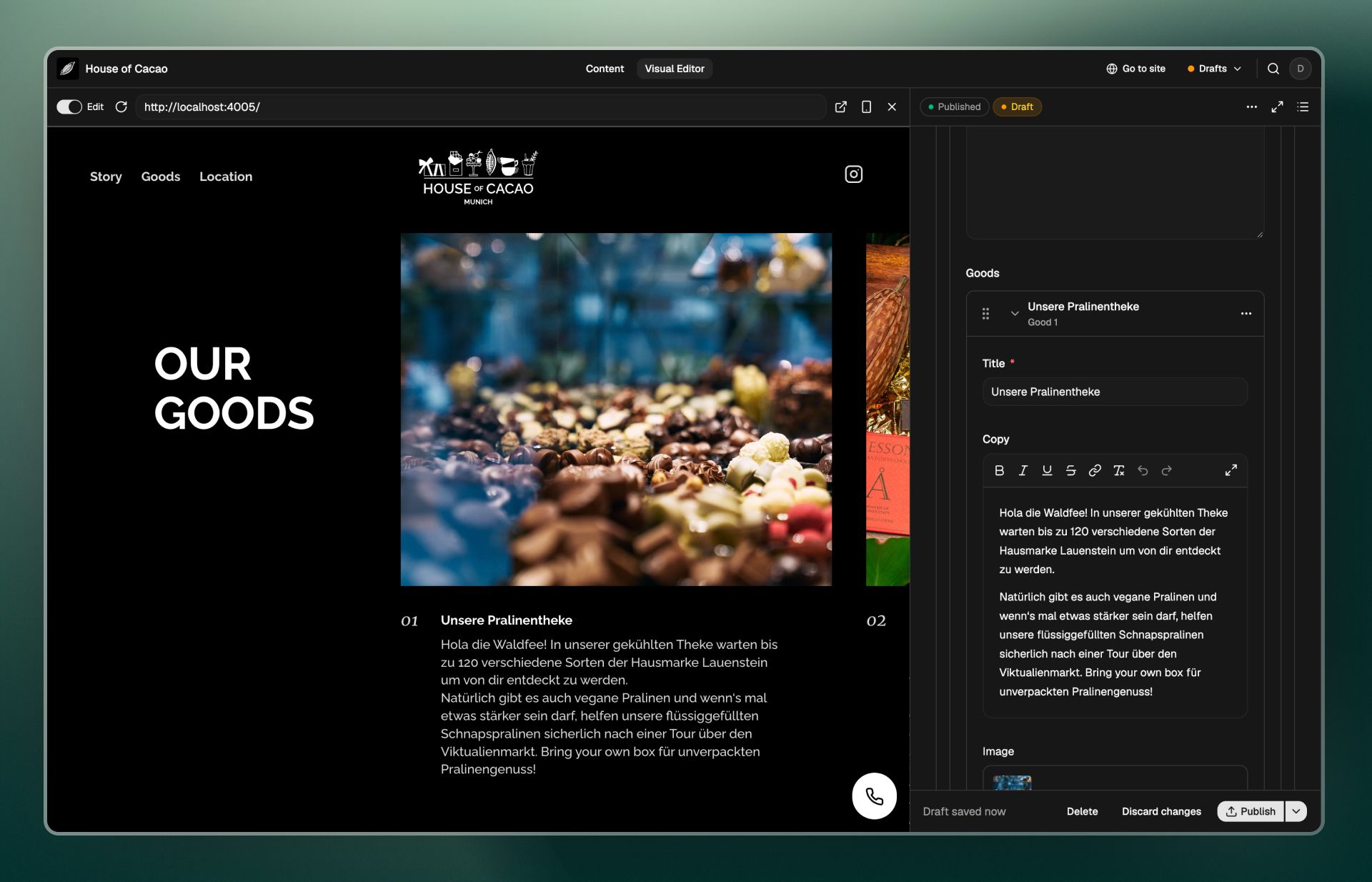
One of the most requested (and helpful) features that clients often request: A live preview where editors see the real site next to the form. In Tenons case, every change shows up on the page while they type, before they save in real-time.
Set it up
Say where a document lives
Set permalink on each collection that has its own pages. The admin opens that URL in the frame:
export const posts = defineCollection({
  permalink: "/posts/{slug}",
  fields: {
    title: { type: "text", required: true },
    slug: { type: "slug", from: "title" },
  },
});
The pages preset sets it for you. See Permalinks for placeholders and functions.
Mark the elements
edit() from tenoncms/preview names the field an element shows. Put it in data-cms:
---
import { edit } from "tenoncms/preview";
---

<h1 data-cms={edit("posts", post.id, "title")}>{post.title}</h1>
<p data-cms={edit("posts", post.id, "author.name")}>{post.author.name}</p>
<script setup lang="ts">
import { edit } from "tenoncms/preview";
</script>

<template>
  <h1 :data-cms="edit('posts', post.id, 'title')">{{ post.title }}</h1>
  <p :data-cms="edit('posts', post.id, 'author.name')">{{ post.author.name }}</p>
</template>
import { edit } from "tenoncms/preview";

<h1 data-cms={edit("posts", post.id, "title")}>{post.title}</h1>
<p data-cms={edit("posts", post.id, "author.name")}>{post.author.name}</p>
A marked element gets the new text on every keystroke. In the visual editor, a click on it opens its field.
- For a global, pass
nullas the id:edit("general", null, "title"). - For a field inside a list, use the position:
edit("pages", page.id, "content.2.title"). For blocks, the Blocks component does this for you. - For an image, add
data-cms-attr="src,srcset,alt", so the attributes change instead of the text. The Image component does this when the element hasdata-cms.
Per framework
Marked elements update in every framework. What else follows while the editor types depends on how the framework renders:
The integration starts the preview on every page and reads drafts for you. There is nothing to add.
Astro pages render on the server. While an editor types, only marked elements change. After each save, the page loads again in the background and swaps in the new HTML, so lists and conditions catch up.
To leave the preview out, pass preview: false to the integration:
export default defineConfig({
  integrations: [tenonCms({ preview: false })],
});
The module starts the preview on every page and reads drafts for you. There is nothing to add.
useTenon() merges the unsaved changes into the data of find, findOne, findById and getGlobal. The whole page follows while the editor types, lists and conditions included.
Every document a page reads also shows under On this page in the visual editor. Editors can open it from there, even without edit(). Add edit() for outlines and clicks.
TanStack Start needs three additions:
- Read with
cms.withSession(getRequest())in the server function, so the page shows drafts. See Drafts. - Call
preview()once in the root route. For visitors without a session, it does nothing. - Pass the loader data through
useDraft(). It merges the unsaved changes, so the whole page follows while the editor types.
import { useEffect } from "react";
import { preview } from "tenoncms/preview";

function Root() {
  useEffect(() => preview(), []);
  // ...
}
import { useDraft } from "tenoncms/preview/react";

function Post() {
  const post = useDraft("posts", Route.useLoaderData());
  return <h1>{post.title}</h1>;
}
For a global, pass its name: useDraft("footer", footer). In Vue outside Nuxt, useDraft() from tenoncms/preview/vue returns a ref.
A CMS on another origin
When the CMS runs on another origin than the site, like cms.example.com, pass the full URL of the admin to preview():
preview({ admin: "https://cms.example.com/admin", morph: true });
- The live preview trusts only that origin. The admin bar calls the API there, with the CMS's cookies.
morph: truerenders the page again from the server after each draft save.- The site and the CMS MUST share a parent domain, and the CMS MUST put its cookies on it. See Share the cookies.
Prerendered pages and preview routes
A prerendered page is built once, at deploy time. It cannot show drafts, so the preview would show the last deploy.
Give the collection a second route that renders on each request, and point preview at it. permalink stays the public URL:
export const posts = defineCollection({
  permalink: "/posts/{slug}",
  preview: "/preview/posts/{slug}",
  fields: {
    // ...
  },
});
---
import Post from "../../../components/Post.astro";

export const prerender = false;

const post = await Astro.locals.tenon.findOne("posts", {
  where: { slug: Astro.params.slug },
});
if (!post) return new Response(null, { status: 404 });
---

<Post post={post} />
- Both routes render the same component, so the preview matches the public page.
- To show published changes on the public page, rebuild the site. A webhook can start the build when an editor publishes.
Keep content out of edit mode
Some content is not for editors to change on the page, like comments that visitors write. visualEditing: false keeps it out of the visual editor:
export const comments = defineCollection({
  visualEditing: false,
  fields: { body: { type: "text" } },
});
Its elements get no outline, and On this page leaves the collection out. A click on one opens the marked element around it, if there is one.
Check for the live preview
isLivePreview() from tenoncms/preview tells whether the page runs inside the admin's preview, for example to skip an intro animation:
import { isLivePreview } from "tenoncms/preview";

if (!isLivePreview()) playIntro();
- On the server, pass the request's headers:
isLivePreview(request.headers). They only show the admin's frame, so a preview tab isfalseuntil the page runs in the browser. - In Nuxt,
useLivePreview()returns the same answer as a ref.
Related resources
- Reading: how pages read drafts.
- Components:
ImageandBlocksmark their fields for you. - Admin: the admin bar, path and branding.