

Fields
Select
One or more values from a fixed list of options.


Example
cms/collections/posts.ts
export const posts = defineCollection({
  fields: {
    category: { type: "select", options: ["news", "guide"], required: true },
    tags: { type: "select", options: ["vue", "react", "astro"], many: true },
    color: {
      type: "select",
      options: [
        { value: "brand", label: "Brand color" },
        { value: "muted", label: "Muted" },
      ],
    },
  },
});
The type of a read is the union of the values:
post.category; // "news" | "guide"
post.tags; // ("vue" | "react" | "astro")[] | null | undefined
post.color; // "brand" | "muted" | null | undefined
- An option is a string, or
{ value, label }when the label in the admin should differ from the stored value. - A label can be translated:
{ value: "brand", label: { en: "Brand color", de: "Markenfarbe" } }.
Render it
---
const categories = { news: "News", guide: "Guide" };
---

<article class={`category-${post.category}`}>
  <span>{categories[post.category]}</span>
  <ul>
    {post.tags?.map((tag) => <li>#{tag}</li>)}
  </ul>
</article>
<script setup lang="ts">
const categories = { news: "News", guide: "Guide" };
</script>

<template>
  <article :class="`category-${post.category}`">
    <span>{{ categories[post.category] }}</span>
    <ul>
      <li v-for="tag in post.tags" :key="tag">#{{ tag }}</li>
    </ul>
  </article>
</template>
const categories = { news: "News", guide: "Guide" };

<article className={`category-${post.category}`}>
  <span>{categories[post.category]}</span>
  <ul>
    {post.tags?.map((tag) => (
      <li key={tag}>#{tag}</li>
    ))}
  </ul>
</article>;
A read returns the stored value, not the label. Map it to a label in your site, as above. Because the type is a union, TypeScript checks that the map covers every value.
Many values
many: true stores a list of distinct values. With required, the list needs at least one value:


A many select cannot be filtered and cannot be unique.
Appearance
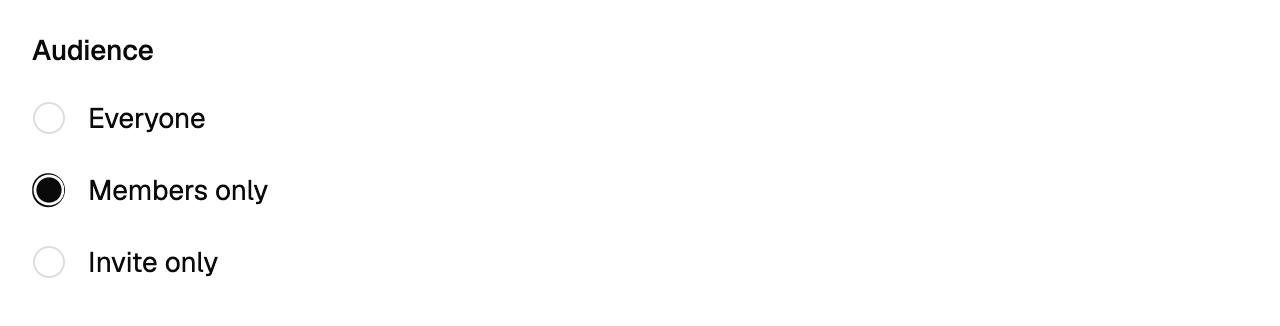
appearance picks the input in the admin:
| Appearance | Input | Fits |
|---|---|---|
"dropdown" (default) | A menu. With many, a combobox with chips | Many options |
"list" | Radio buttons, or checkboxes with many | A few options |
"buttons" | A row of toggle buttons | Two to five short options |
align: { type: "select", options: ["left", "center", "right"], appearance: "buttons" },



Options
false."dropdown".Every field type takes these options. See the fields overview for examples and validation.
label
string | { en, de, … }
The label in the admin. Defaults to the key. Pass an object to translate it.
description
string | { en, de, … }
Help text below the input.
required
boolean
The value MUST be present. A list needs at least one item.
default
value | ({ user, … }) => value
The value of a new document, when the field is missing. A plain value also fills the new form in the admin. A function, like
({ user }) => user?.id, runs on the server only.unique
boolean
No other document of the collection has the same value. See Validation .
validate
(value, args) => true | string
Your own check. See Your own checks .
condition
Condition
Show the field only when other values match. See Conditions .
private
boolean
Public reads leave the value out. Signed-in users and server code see it.
access
{ read, create, update }
Who can read and write this field. See Access control .
localized
false
In a localized collection, every field is stored per language. Localization .
false shares this field between languages. Only on top-level fields. See hooks
FieldHooks
Functions that run for this field on every write and read, before the collection's hooks. See Hooks .
hidden
boolean
Admin only
The admin does not show the input. The value still saves. Use it for values a hook sets.
readOnly
boolean
Admin only
The admin shows the input disabled. Code and hooks can still write it.
width
"1/4" | "1/3" | "1/2" | "2/3" | "3/4" | "full"
Admin only
The share of the row the field takes. Fields next to each other fill a row. In a narrow form, every field takes the full width. Default
"full".separator
true | string
Admin only
A line above the field, to break up a long form. A string adds a heading above the line.
tab
string | string[]
Admin only
The tab that shows this field. Define the tabs with
tabs on the collection, global, group or list item.fieldset
string
Admin only
The box that holds this field. Define the boxes with
fieldsets.